

一、专业版
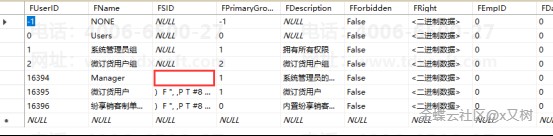
1、清除管理员manager密码
update t_user set fsid=null where fname='manager'
go
或者在数据库实体里删除
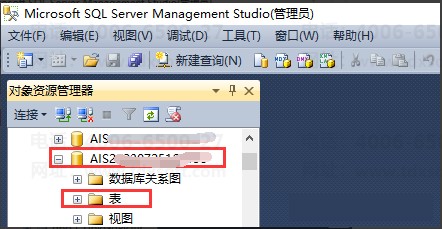
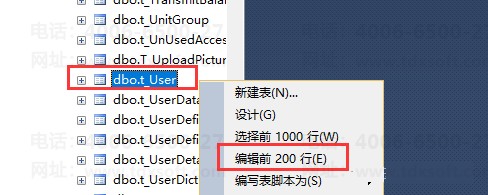
数据库—实体—表—dbo.t-User右击编辑前两百行—manager清除
2、库存类语句
①不允许负库存出库
update t_systemprofile set fvalue=0 where fcategory='IC' and fkey='UnderStock'
②不允许负库存结账
update t_systemprofile set fvalue=0 where fcategory='IC' and fkey='UnderStockCalculate'
③允许负库存出库
update t_systemprofile set fvalue=1 where fcategory='IC' and fkey='UnderStock'
④允许负库存结账
update t_systemprofile set fvalue=1 where fcategory='IC' and fkey='UnderStockCalculate'
⑤库存保存更新
update t_systemprofile set fvalue=1 where fcategory='IC' and fkey='UPSTOCKWHENSAVE'
⑥库存审核更新
update t_systemprofile set fvalue=0 where fcategory='IC' and fkey='UPSTOCKWHENSAVE'
2、有PT202020补丁引起的问题
之前碰到过该问题的解决方案:
由于PT202020的补丁号较大,如果打过PT20202再打其他补丁,需要去数据库清除该补丁名称,同时在注册表中修改补丁号。
---1、清除补丁脚本:
delete from t_PatchLst where FPatch ='202020'
go
---2、注册表修改补丁号(路径):
运行→regedit→HKEY_LOCAL_MACHINE→SOFTWARE→Kingdee→KISPRODUCT→ServicePackVerson修改补丁号
二、旗舰版
1、清除账套管理admin密码
数据库中选中AcctCtl_KEE数据库,执行语句 update t_Users set FPassword = '' where FName = 'Admin'
2、清空工作台导航栏数据
Delete From t_AP_AppVisitInfo where FUserID in (select FUserID from t_User where Fname = '用户名称')
3、旗舰版用户异常,卡死执行语句
delete from t_userprofile where fuserid=(select fuserid from t_user where fname='异常用户')
三、商贸版
1、清除管理员manager密码
update t_user set FSID=null where FName='manager'
2、6.0清除日志语句
delete from t_log go